Productivity•8 min read•
How to Build a Study Dashboard in Your Browser (for Students)
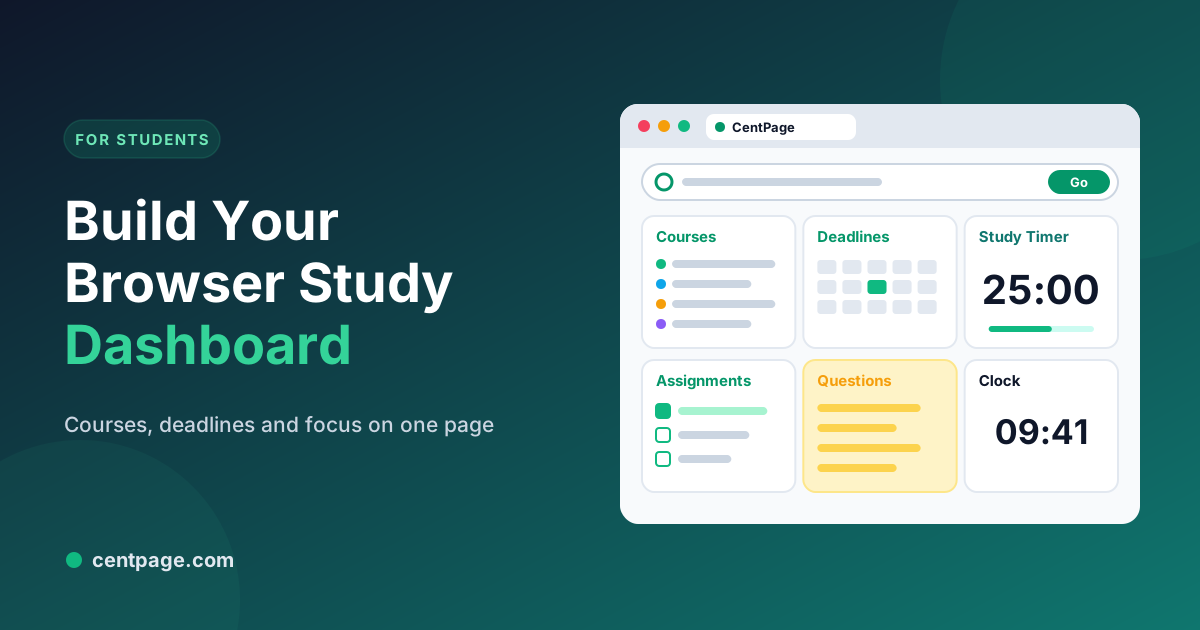
Set up a browser study dashboard with your course links, deadlines, a focus timer and quick learning tools, so every new tab helps you study instead of distracting you.
Key Takeaways
- Put your course portals, library and assignment links in one table so you stop hunting through bookmarks and emails.
- Keep deadlines and today’s tasks visible on every new tab.
- Use a Pomodoro timer for study blocks, and test yourself from memory during breaks.
- Add a few learning tools you use often, such as a calculator, unit converter or dictionary, and nothing that scrolls endlessly.
Studying happens in the browser now: the course portal, lecture recordings, the library database, shared documents, the assignment submission page. So does procrastination. The difference between the two is often one click, and the new tab page decides which one you make.
A study dashboard turns every new tab into a reminder of what you’re working on and a launchpad for the tools you need.
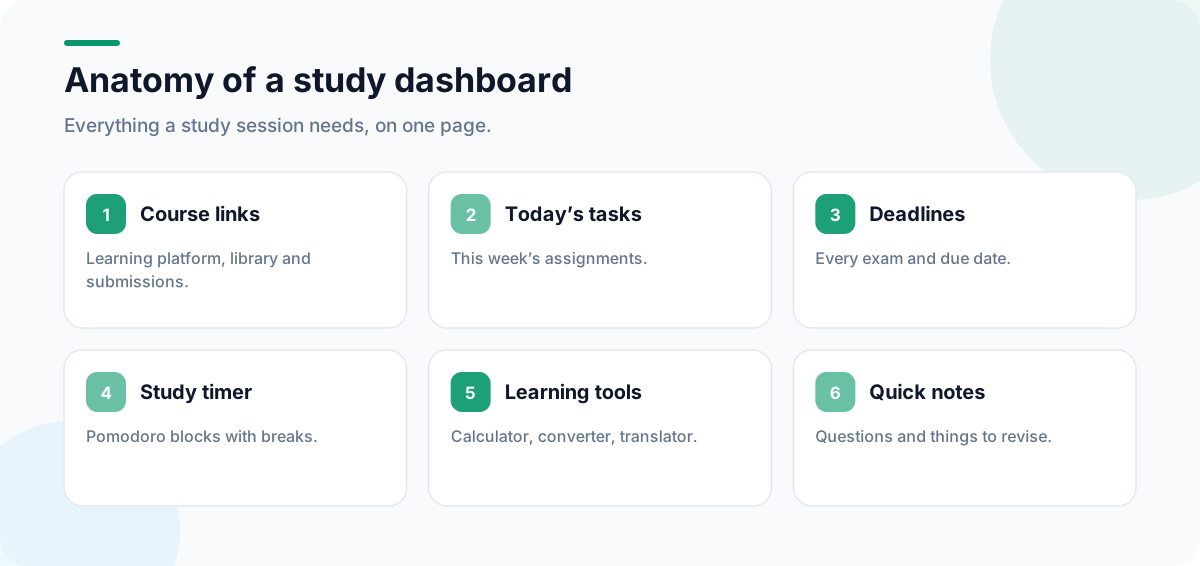
What a study dashboard looks like
Step 1: Gather your course links
Make a list of every site you open for your studies: the learning platform, each course page, the library, your email, the timetable, shared drives, the assignment submission pages. Then keep the seven or eight you use most in one place.
In CentPage, create a custom table called “Courses” or “Uni” and add those links. The free plan includes one custom table with up to eight links, which is enough for most students; Premium allows five tables, for example one per semester or subject.
Step 2: Make deadlines impossible to miss
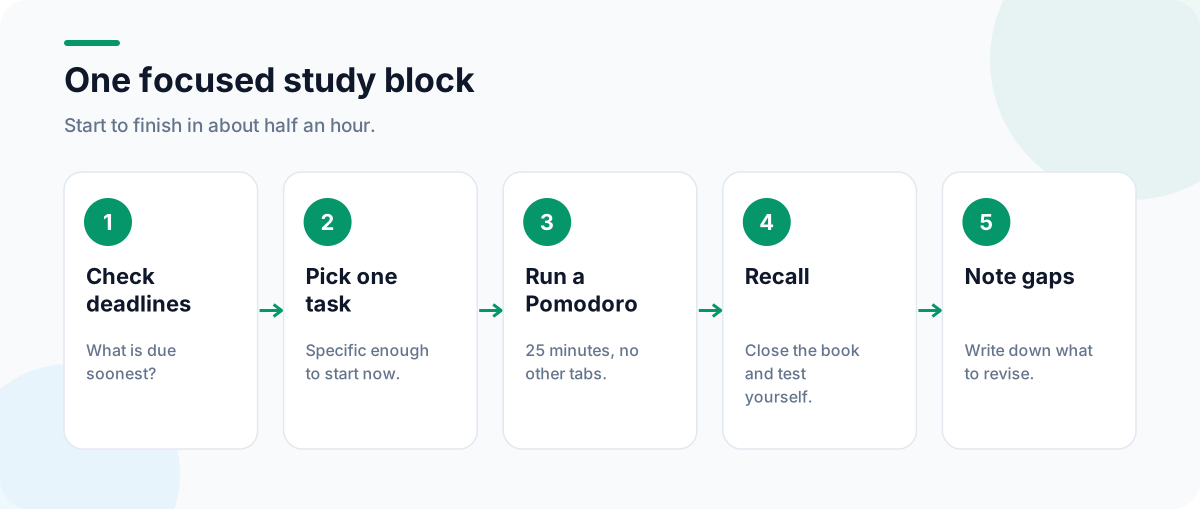
Add the Calendar and To Do List widgets. At the start of each week, add every deadline and exam to the calendar, then list this week’s assignments as tasks. Because the list is on your new tab, you’ll see it dozens of times a day, which is exactly what deadlines need.
Step 3: Study in focused blocks
Add the Pomodoro Timer widget and study in 25-minute blocks with 5-minute breaks. Use the breaks to close the book and recall what you just covered; testing yourself from memory is one of the most effective ways to learn. Our guide to the Pomodoro Technique in your browser covers the method in detail.
Step 4: Add a few learning tools
Choose tools for your subjects. All of these are CentPage widgets, and most also work as standalone pages on centpage.com:
| Subject | Useful widgets | Plan |
|---|---|---|
| Maths and science | Calculator, Unit Converter, Interactive Periodic Table | Free |
| Languages | Language Translator, Word of the Day | Free |
| Writing | Sticky Notes, Dictionary | Free / Premium |
| General knowledge | Daily Fact, On This Day | Free |
| Typing practice | Typing Speed Test | Premium |
You can try the calculator, unit converter or Pomodoro timer without installing anything.
Step 5: Remove the distractions
- No feeds on your study dashboard. Leave out news, video and entertainment widgets.
- Use a separate browser profile for studying, with only study links and extensions.
- Close what you’re not using. Save research tabs as a session with Super Session Manager instead of leaving them open.
Our distraction-free browser setup goes further.
Learning from video lectures
Long lecture recordings and YouTube tutorials are valuable but slow. SummaryTube summarizes YouTube videos with key moments and a transcript, so you can preview a video before watching or review it afterwards. Use summaries as a revision aid, not a replacement for the lecture itself.
Keep notes where you study
Stray thoughts, questions for your tutor and page numbers to look up later all need somewhere to go. The Sticky Notes widget is ideal for that; see our guide to taking quick notes in your browser. For a broader dashboard design, read how to build a productivity dashboard.
Install CentPage for Chrome or Firefox to make your study dashboard your new tab.
Frequently Asked Questions
What should a student study dashboard include?
Links to your course portals, library and assignment pages; a to-do list and calendar for deadlines; a focus timer; and a few tools you use daily, such as a calculator or translator. Leave out feeds and entertainment during study time.
Is CentPage free for students?
The core dashboard and 20 widgets are free, including To Do List, Calendar, Pomodoro Timer, Calculator, Unit Converter, Language Translator, Word of the Day and the Interactive Periodic Table. Premium adds widgets such as Dictionary and Typing Speed Test.
How long should study sessions be?
Twenty-five to fifty minutes with a short break is a good range for most people. Shorter blocks help when a subject is hard to start; longer blocks suit essays and problem sets once you’re warmed up.
How do I stop getting distracted when studying online?
Close unrelated tabs, mute notifications, use a separate browser profile for study, and make your new tab a study dashboard rather than a page of shortcuts to social media and video sites.
Tags:#Study Dashboard#Student Productivity#Study Timer#Online Learning#Homework Planner#Focus While Studying
More from the CentPage Blog
Productivity
How to Use the Pomodoro Technique in Your Browser
Learn the Pomodoro Technique, run 25-minute focus sessions right in your browser, and adapt the method for coding, studying and meetings-heavy days. Includes a free online Pomodoro timer.
8 min readRead →
Guides
How to Create a Productivity Dashboard for Work and Study
Learn how to create a productivity dashboard in 6 steps, with ready-made setups for professionals, developers and students you can copy into your browser today.
10 min readRead →